Fix: Last Stop Roblox Can't Sit in the Driver's Seat Guide
Struggling because in Last Stop Roblox you can't sit in the driver's seat? Learn how to fix seat bugs, repair the bus, and survive the zombie apocalypse.
Published:
Table of Contents
Imagine you have just spawned into the post-apocalyptic world of The Last Stop, ready to scavenge and survive, only to find that in last stop roblox can't sit in the driver's seat. This common frustration often stems from either a missed tutorial step or a known Roblox engine bug that prevents character interaction with seat parts. Understanding how to interact with the vehicle is the first hurdle in this high-stakes survival game, where being stuck at the bus stop usually means a quick death by zombie hordes. If you find that in last stop roblox can't sit in the driver's seat, you are not alone, and this guide will walk you through every mechanical requirement and technical fix to get you on the road.
Quick Answer
Most players cannot sit in the driver's seat because the bus is not yet functional. You must first attach all four wheels using the Z key and add fuel to the furnace. If the bus is repaired but you still cannot interact with the seat, it is likely a server-client desync bug that requires a character reset or a lobby rejoin.
The Tutorial Checklist: Why You Can't Drive Yet
In Last Stop, the game does not allow you to enter the driver's seat until the vehicle is technically "road-ready." Many new players mistake the initial inability to sit as a bug, when in fact, it is a gameplay mechanic designed to teach you about bus maintenance. Before the interaction prompt for the seat appears, you must complete the following sequence of events.
1. Attaching the Wheels
The bus spawns without its tires. You will see four loose wheels scattered around the immediate starting area. You must pick these up one by one and bring them to the wheel wells.
Action: Pick up a tire.
Keybind: Press Z to attach the wheel to the frame.
Common Error: If the wheel won't attach, ensure you are aiming directly at the axle/well. According to player experience, aim issues are more common than actual code bugs during this phase.
2. Fueling the Furnace
The "engine" of the bus is actually a furnace located near the rear or middle of the interior. Even if the wheels are on, the driver's seat remains inactive if the fuel level is zero.
Action: Locate the red gas can in the starting zone.
Keybind: Drop or interact with the furnace to feed it.
Requirement: The prompt "Take the wheel and drive the bus" only triggers once the furnace has an active burn time.
3. Level Requirements
While the driver's seat is usually open to everyone, certain aspects of the bus, like the Vault, are locked until you reach Level 3. Ensure you aren't trying to interact with a locked component thinking it is the driver's seat.
Technical Fixes for the Seat Bug
If you have attached the wheels and fueled the furnace, but you still find that in last stop roblox can't sit in the driver's seat, you are likely dealing with a technical glitch. Community reports on the Roblox Developer Forum have highlighted a recurring issue where SeatParts fail to register a player's touch.
Community-Recommended Solutions
The Character Reset: If you previously sat in a seat and jumped off, the server might still think you are "sitting." Resetting your character via the escape menu forces the server to update your state to Sitting = false.
The Jump-Request Fix: Some players have found success by spamming the spacebar (jump) while walking into the seat. This can sometimes trigger the Humanoid.Sit property to update correctly.
Lobby Desync: If you are playing in a high-latency server, the "E" or "W" prompts might not appear. Try standing still for 5 seconds next to the seat to allow the client to catch up with the server.
Problem
Potential Cause
Suggested Fix
No Interaction Prompt
Bus is not repaired
Attach 4 wheels and add fuel
Prompt appears but does nothing
Server-Client Desync
Reset character or rejoin lobby
Stuck in "Sitting" animation
Roblox Engine Bug
Press Spacebar or Reset Character
Steering doesn't work
Mechanical Failure
Check if furnace has run out of fuel
Mastering the Controls: PC Keybinds
Once you successfully fix the issue where the last stop roblox can't sit in the driver's seat, you need to know how to actually operate the vehicle. Unlike standard driving games, Last Stop uses a simplified but specific set of inputs.
Input
Action
Importance
W
Accelerate / Drive
Essential for forward momentum
Click
Grab / Shoot
Used for looting and defense
Z
Place / Build / Attach
Critical for bus repairs and upgrades
E
Equip / Use
Interactions with NPCs and items
Q
Drop Item
Managing inventory space
R
Reload
Keeping your ranged weapons ready
Tab
Inventory
Checking your resources
Y
Inspect Item
Identifying if an item is fuel or cargo
Steering in Last Stop is largely automatic or restricted to lane-shifting. Your primary job as a driver is managing speed and knowing when to stop at "Loot Buildings" or "Terminals."
Fuel Management: Keeping the Furnace Burning
Fuel is the literal lifeblood of your run. If your furnace dies, the bus stops, and you become a sitting duck for zombies. If you find that last stop roblox can't sit in the driver's seat midway through a run, check your fuel gauge first.
Fuel Sources Comparison
Not all fuel is created equal. You must scavenge constantly to keep the fire alive.
Fuel Type
Efficiency
Where to Find
Gas Can
High
Loot buildings, car wrecks
Coal / Coal Block
Medium
Scrapyards, purchased at Terminals
Zombie Bodies
Low
Dropped by defeated enemies
Scrap Wood
Low
Crafting leftovers, broken furniture
Pro Tip: Burn the Dead
Don't waste your precious gas cans on small trips. After a zombie raid, pick up the corpses and toss them into the furnace. It is a "free" way to maintain momentum without spending salvage at a Terminal.
The Importance of Bus Defenses
Getting into the driver's seat is only half the battle. Once you are moving, zombies will attempt to board the bus. If your bus is "naked" (no walls), they will hit you while you are driving, potentially knocking you out of the seat and causing a wipe.
Essential Early-Game Crafts
Using the Crafting Workbench inside the bus, you should prioritize these items:
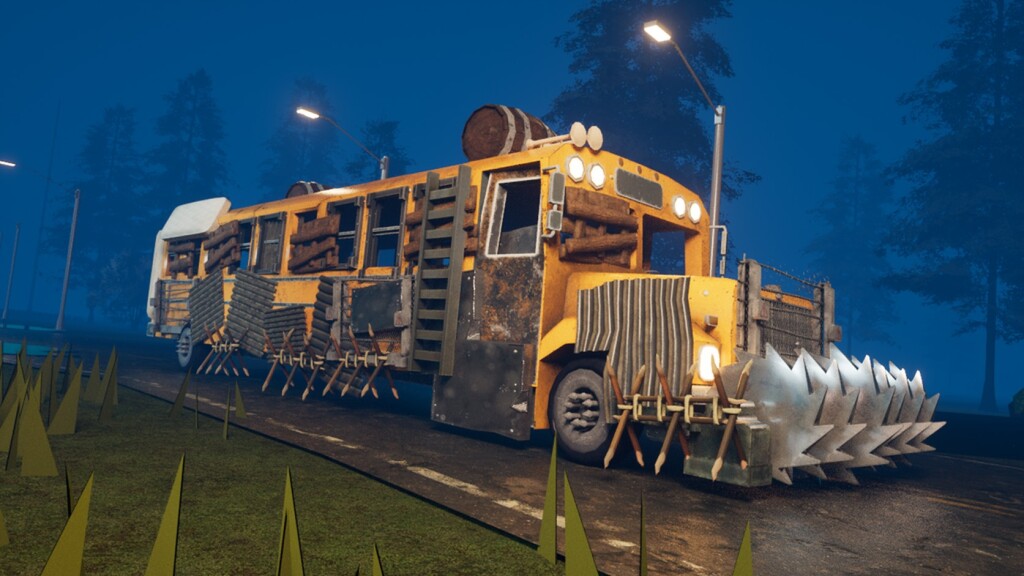
Wooden Walls: Prevents zombies from jumping through the sides.
Wooden Door: Allows you to exit for loot while keeping the interior safe.
Log Grill: Protects the front of the bus from impact damage and roadblocks.
Wooden Chest: Essential for storing spare wheels and ammo so they don't roll off the bus.
Classes and Starting Gear
Your ability to handle the bus and the seat bug might also depend on your chosen class. If you are struggling with survival, consider rerolling your class in the lobby using Tickets (use codes like FRED or UPDATE1 for free currency).
Driver: Starts with better vehicle handling and basic tools.
Carpenter: Ideal for players who want to build the ultimate armored fortress.
Medic: Essential for long-distance runs to heal the team after bandit encounters.
Juggernaut: High HP, making it easier to survive if you are forced to get out and push a boulder.
Navigating Terminals and Safe Zones
Terminals act as checkpoints. This is where you can sell "Cargo" (items like the Carved Bust or Antique Globe) for cash.
Don't Sell Everything!
New players often sell gas cans and coal for quick cash. Never do this. Only sell items that have no mechanical use for the bus. A $200 statue is useless if you run out of fuel 50 meters past the gate.
What to Buy at Terminals
Ammunition: Especially Medium Ammo for the Revolver.
Armor: Metal chestplates significantly increase your effective HP.
Spare Wheels: Always keep at least one Basic Wheel in your bus chest. If a tire pops and you don't have a spare, the run is over.
NPC Quests: Detective Jack Hollow and Fred
As you progress, you will encounter NPCs who join your bus.
Detective Jack Hollow: He is looking for Fred. Keeping him alive provides significant rewards, but he is fragile. If he dies, you lose the questline.
The Civilian: Found in cages at bandit camps. Rescuing them often leads to safe passage or unique loot.
The game eventually culminates in a confrontation with Fred. Whether you decide to kill him or use a Cure Potion determines your ending. Based on community reports, the "Cure" ending is much harder to achieve because it requires the entire team to stop dealing damage once the potion is applied.
FAQ: Troubleshooting the Driver's Seat
Why can't I sit in the driver's seat in Last Stop Roblox?
Usually, this is because the bus is missing wheels or fuel. Ensure all four tires are attached with the Z key and that you have placed a gas can or coal into the furnace. If the bus is fully repaired and fueled, try resetting your character to fix a potential seat interaction bug.
How do I fix the seat bug without restarting the game?
Try jumping (Spacebar) while walking into the seat, or use the "Reset Character" option in the Roblox menu. This usually clears any server-side flags that think your character is already occupied.
Can other players drive my bus?
Yes, Last Stop is a cooperative game. Any player can sit in the driver's seat as long as the bus requirements are met. However, it is best to have one designated driver while others focus on crafting and defense.
What do I do if the bus hits a boulder?
You must exit the bus and manually push the boulder out of the way. If your character feels "weak," ensure your hunger bar is filled by eating items like Chocolate Bars or Apples. In some cases, multiple players might need to push together.
By following these steps, you can overcome the common issue where in last stop roblox can't sit in the driver's seat and begin your journey toward the final checkpoint. Keep your furnace hot, your walls high, and your ammo pouches full!